ActivityWatch tracks your screen time without spying on you
Ever reached the end of a day at your computer and wondered where all the time went? Between work, web browsing, and gaming, hours slip away unnoticed. ActivityWatch is a free, open-source application designed to show exactly how you use your computer, helping you identify what keeps you focused and what distracts you.
Once installed, ActivityWatch runs quietly in the background. It monitors the apps you open and the titles of your active windows, giving you a clear picture of your digital habits. A companion browser extension tracks your active tab in Chrome, Firefox, or Edge, so you can see which websites actually capture your attention. The app also detects when you step away: after three minutes without any input, it automatically marks you as away from the keyboard. If your computer sleeps or hibernates, no activity is recorded at all.
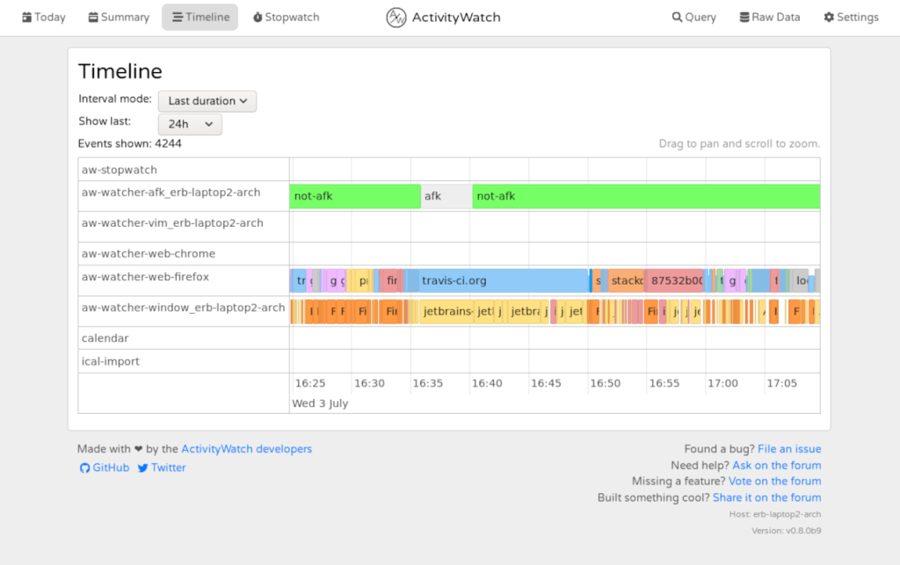
The dashboard presents a timeline and charts for your day, breaking down how much time you spent in Word, on YouTube, playing a game, or reading email. You can sort these tasks into custom groups such as work, leisure, or communication, which makes the data much easier to scan and interpret at a glance.
The reviewer notes that other time-tracking tools often try to guilt-trip users into being more productive, which can feel manipulative. ActivityWatch takes a different approach: it simply presents the facts and lets you draw your own conclusions. This makes it a great choice for anyone who wants to understand their habits without being shamed into changing them.
Privacy is a core strength of ActivityWatch. Unlike many commercial trackers, it does not send your data to external servers. Everything stays on your device, and because the code is open source, anyone can verify how the software handles information. This transparency sets it apart from proprietary alternatives.
ActivityWatch supports Windows, macOS, and Linux, and installation is straightforward. The interface is clean and intuitive, making it accessible even for less tech-savvy users. Since the project is open source, advanced users can customize it or contribute to its development.
For those who want to regain control over their screen time without sacrificing privacy, ActivityWatch offers a practical, no-nonsense solution. It does not judge, it does not lecture, and it does not sell your data — it simply shows you where your time goes, leaving the decision to change in your hands.