One Registry tweak fixed File Explorer lag — and the cause was unexpected
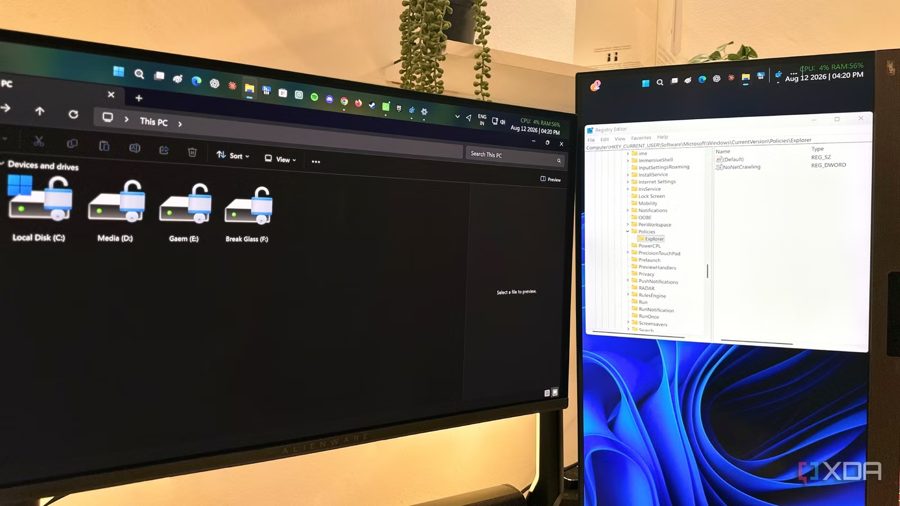
Windows File Explorer usually stays out of the way, but it becomes impossible to ignore when it starts slowing you down. The author of this piece found that folders were taking an unusually long time to open. The delays clustered around moments when Explorer tried to reach out to the network: opening a new window, clicking into the navigation pane, or expanding This PC. At those points, Explorer would pause, as if it needed to check something before showing what was already on screen.
The root cause, as it turned out, had nothing to do with the SSD, RAM, or any bloated background application. Windows was spending time worrying about network storage locations that had barely been used in months. File Explorer doesn't just track files on your local drive — it also maintains information about network locations and mapped drives. This is meant to let Explorer find and display shared folders and storage resources without treating every visit as a first-time introduction.
On paper, this sounds useful, especially if you regularly access a NAS, an office server, or a shared folder over a local network. The catch is that Windows doesn't necessarily know whether that network storage is still there, awake, connected, or worth waiting for. If any of those network locations turn out to be slow, asleep, or simply gone, Explorer can stall while waiting for a response that never comes.
The fix turned out to be surprisingly simple. Instead of a dramatic Windows overhaul, a small change in the Registry Editor made the difference feel immediate. The tweak essentially tells File Explorer not to wait around for network storage that isn't responding. After applying it, the author noticed that folders opened without the usual hanging — no more pauses when navigating between directories or expanding This PC.
That said, this approach isn't for everyone. If you actively use network drives or shared folders on a daily basis, disabling the check could make access to those resources less reliable. The author notes that the change is best suited for users who rarely touch network storage and just want their local file browsing to feel snappy again. For those people, this single Registry edit can eliminate the most noticeable source of Explorer lag without any side effects worth worrying about.