Hidden Office button: email your open file with one click, no attachments needed
Microsoft Office users often waste time sending documents by email, dragging files into the mail client window or using the File menu. But Excel, Word, and PowerPoint hide a feature that attaches the current file to a new message with a single button press — and most people simply miss it.
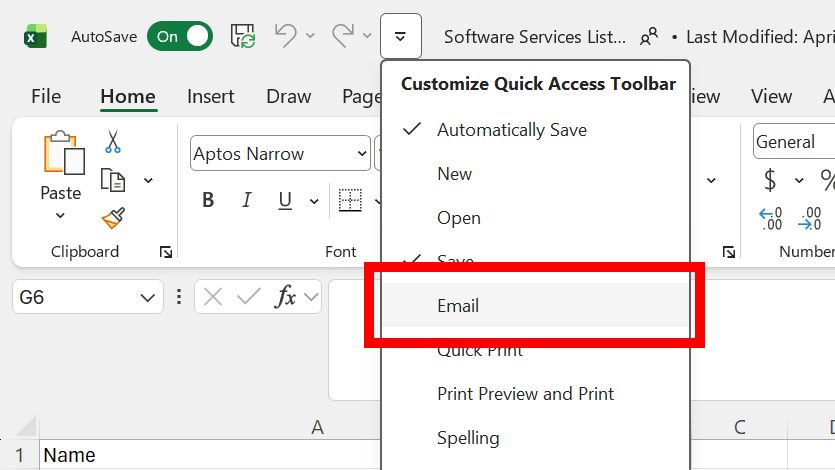
To use this trick, look at the Quick Access Toolbar at the top of the program window. There, you will find a drop-down menu marked by an icon with a horizontal line and a downward arrow. Open it, select «Email», and a new item — an envelope icon — will appear on the toolbar.
After that, just click the envelope, and the system will launch your default email client, usually Outlook. It will automatically create a draft message with the file already attached: the Excel sheet, Word document, or PowerPoint presentation you are currently working on. No extra steps like searching for the file in Explorer or dragging it are needed.
The activation process is the same across all three apps. In Word and PowerPoint, repeat the same steps: open the menu on the Quick Access Toolbar, choose the Email command, and the envelope button will be ready to use. Every time you press it, the mail client opens with a new draft and the current document attached.
This feature is especially handy for those who regularly share files with colleagues or friends, as it cuts the path from finishing a document to sending it down to one click. It is worth adding to the Quick Access Toolbar right away, so you do not have to hunt for the command in settings every time.