Spotify’s Playlist Notes let users and editors explain song picks — here’s how it works
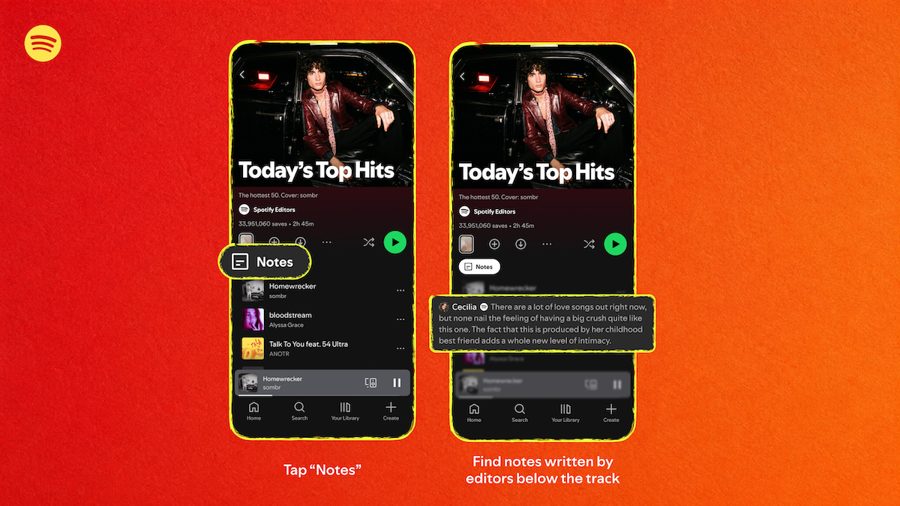
Spotify has launched a new feature called "Playlist Notes," which allows users to add their own commentary to songs, podcast episodes, and audiobooks in the playlists they create or collaborate on. The feature builds on "User Notes," introduced last month, which let listeners attach personal notes to individual tracks.
With Playlist Notes, users can provide context for their selections — for example, explaining that a song reminds them of someone, evokes a specific memory, or is simply a track they believe everyone should hear. To add a note, users open a playlist they own or co-edit in the mobile app, tap the three dots next to a track, choose "add note," and save it. The note becomes visible to anyone who can view the playlist.
Spotify is also extending the feature to its own editorial playlists. Editors can now add notes explaining why certain songs were chosen. Initially, listeners will see these notes on some of Spotify's biggest playlists, including Today's Top Hits, RapCaviar, Hot Country, All New Pop, and Fresh Finds Hip-Hop.
In addition, Spotify is introducing Editor Profiles. These profiles showcase an editor's top tracks and albums, along with the playlists they curate. The goal is to give listeners more insight into the people behind Spotify's curated recommendations.
User-created Playlist Notes are rolling out on iOS and Android devices in more than 100 markets. Editor notes and editor profiles are available to free and premium users aged 16 and older in the United States, Canada, the United Kingdom, Ireland, Australia, and New Zealand.
While the feature may seem minor, it fits into Spotify's broader strategy of making the listening experience more social and personalized. By allowing both users and editors to add context, the company aims to deepen engagement with playlists and help listeners discover music through personal stories and expert curation.