Jellyfin plugin upgrades bare-bones media server with Netflix-style ratings and quality badges
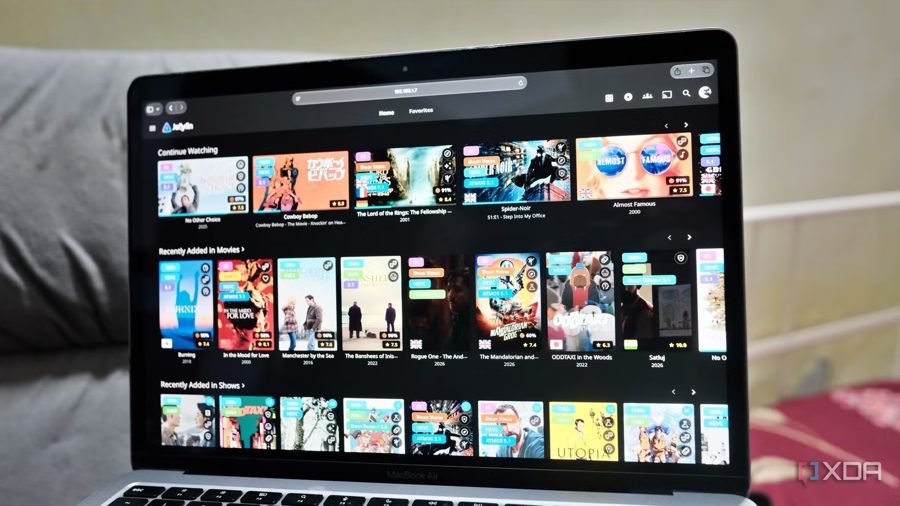
The Jellyfin media server, which plays any content without subscriptions or annoying notifications, can be significantly upgraded with the Jellyfin-Enhanced plugin. It adds information to movie and TV show posters that users expect from major streaming platforms: video quality, ratings, genres, and available audio tracks.
Quality tags indicate whether a file supports 4K, HDR, Dolby Vision, or Atmos. This makes it easy to decide whether to watch content on a TV or a tablet without opening metadata. Ratings are pulled from Rotten Tomatoes and TMDB and displayed directly on the poster as well as in the player. Country flags show available audio track languages, while genre icons help quickly distinguish content — a single poster can carry up to three such badges.
Netflix does not show any of these details while scrolling through its main interface. With Prime Video, checking supported audio tracks and subtitle languages requires a few extra taps. The plugin solves this by putting everything needed right on the poster.
The "Continue Watching" section also gets a fix. In most streaming apps, this row randomly moves around the interface. Netflix applies internal logic that is hard for users to figure out, and Prime Video makes users hunt for their next episode. Jellyfin-Enhanced makes this section predictable by keeping it in a fixed position, eliminating the guesswork.
The plugin also brings other interface improvements, including keyboard shortcuts, making library navigation more convenient. As a result, a Jellyfin server gains features users appreciate on commercial platforms, minus their drawbacks like pushy recommendations and hidden options.