How to remove the 'Try the new Outlook' button with a quick registry tweak
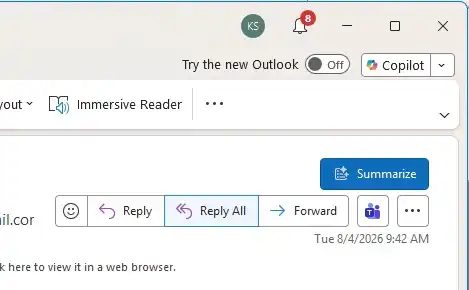
Users of the classic Outlook can get rid of the "Try the new Outlook" button that has been appearing in the interface for several months. Microsoft is actively pushing users to switch to the new version of the email client, but it still lags significantly behind the old one in terms of features.
Moreover, the new Outlook stores emails only in the cloud on Microsoft servers, which many users find unappealing. To avoid accidentally switching to the new version, the button can be disabled by editing the Windows registry.
First, close the classic Outlook. Then type regedit into the search box on the taskbar and launch the Registry Editor. Navigate to HKEY_CURRENT_USER\Software\Microsoft\Office\16.0\Outlook\Options\General, right-click in the right-hand pane, and select "New > DWORD (32-bit) Value." Name the new value HideNewOutlookToggle.
After that, double-click the created entry and set its value to 1. When Outlook is restarted, the toggle will disappear from the interface, eliminating the risk of accidentally switching to the new version.