How to check iPhone battery health and cycle count before buying used — Apple made it easier
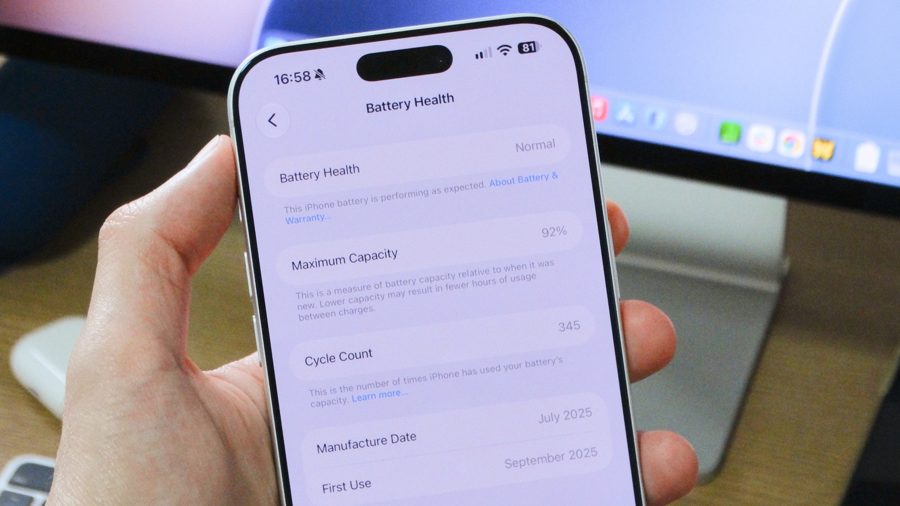
All iPhone batteries degrade over time. They are consumable components that chemically wear out, losing their ability to hold a full charge. This directly affects daily usage. Apple provides built-in tools in iOS to monitor battery health and cycle count — the number of full discharge and recharge cycles the battery has undergone. Understanding these metrics is essential for knowing when a replacement is due, or for evaluating a used iPhone before purchase.
To check battery health, open the Settings app, tap "Battery," and look for the "Battery Health" section. On older models like the iPhone 13, this section may be labeled "Battery Health & Charging." The screen shows an estimate of your iPhone's maximum battery capacity relative to when it was new, along with other useful information.
The "Maximum Capacity" percentage indicates the overall condition of the battery. According to Apple, a typical battery is designed to retain up to 80% of its original capacity under normal conditions. For the iPhone 15 and later models, this estimate is based on 1,000 full charge cycles. For older models, the estimate is that the battery will last up to 500 cycles before degrading significantly. When the maximum capacity drops below 80%, Apple recommends replacing the battery.
Cycle count is a more precise indicator of wear. On iPhone 15 and newer, the cycle count is displayed directly in the Battery Health section. On iPhone 14 and older, you need to go to Settings General About and tap on the "Cycle Count" line. If nothing appears there and your iOS is updated to version 17.0 or later, the cycle count feature may not be supported on that particular model.
For iPhone 15 and newer devices, there is an additional setting in the Battery section that allows you to limit charging to 80% to extend battery lifespan. You can also disable optimized charging if needed.
Apple warns that if the battery has been replaced by an unauthorized service provider, iOS may not display battery health information. In such cases, a notification will appear: "Unable to verify this iPhone has a genuine Apple battery." Apple recommends using only authorized service centers for battery replacements.