GNOME Shell extension adds karaoke-style word-by-word lyrics highlighting
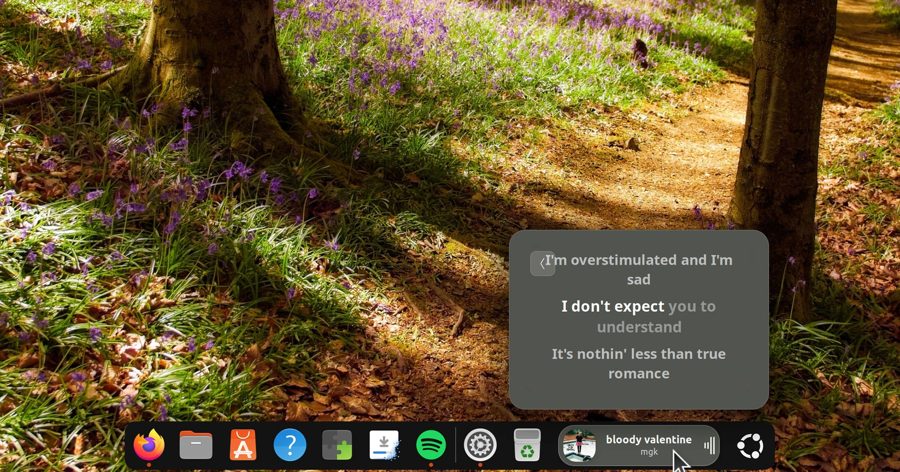
The updated Dynamic Music Pill extension for GNOME Shell can now highlight lyrics word by word as a track plays. Version 1.3.0 adds support for two new lyrics providers, BetterLyrics and BiniLyrics, which use TTML format for word-level synchronization with music.
If the selected provider has timing data for the track you are listening to, the extension displays lyrics with word-by-word highlighting, like in karaoke. Otherwise, it falls back to line-by-line display, or to static text if no synchronized data is available, or shows no lyrics at all.
The extension is designed to show now-playing track information and lyrics in the GNOME Shell top panel or dock with animated effects. This update is especially useful for those who like to sing along while working at their computer.
Dynamic Music Pill continues to evolve as a desktop customization tool, offering users not only basic info about the current track but also advanced options for displaying lyrics. The new providers expand the range of tracks with precise synchronization, making the feature useful for a wider variety of music.
Developers note that provider selection happens automatically, so users do not need to manually configure which source to use. The system itself determines whether any of the available providers has timing data for the current track.
This update is available to all GNOME Shell users who have the Dynamic Music Pill extension installed. Version 1.3.0 is out now and can be downloaded from the official GNOME extension catalog or from the project's repository.