GNOME extension brings multiple photo widgets to your desktop, each with its own folder
Last year I covered a GNOME extension that added a picture widget to your desktop. It was neat, but a bit basic for those who like to customise. Turns out I wasn't the only one who thought so — another user found it lacking flexibility, so they forked and improved it.
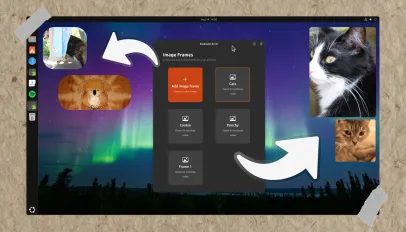
The result is Picture Desktop Widget Remake. As the name suggests, it's a remake of the original, and it addresses the biggest limitation: you can now add multiple picture widgets to your Ubuntu desktop. Each widget can be assigned a different folder to pull images from, and it picks photos at random.
What really sets this apart is the level of control. You can set the size, position, border radius and aspect ratio of each widget individually. Every photo frame also gets its own on/off button in Preferences, so you can hide a widget without deleting it entirely — handy if you want to temporarily clear space.
I've always been a sucker for desktop clutter — clocks, Conky scripts, now-playing music controllers. I rarely maximise windows, so there's always blank desktop staring back at me. Why not fill it with photos?
Having tried the extension, I can report that it works, but with quirks. When editing a new widget, the existing ones often showed the same image, despite being assigned different folders. The only way to fix that was to turn the entire extension off and on again.
You also can't set a single image or disable the refresh entirely — an edge case, perhaps. There's no way to control how the frame constrains the image when you adjust the aspect ratio, which is annoying since taller and wider frames often crop photos awkwardly.
The biggest gotcha, though, is that you can't drag these little photo widgets around the desktop to reposition them. That's a notable limitation for something meant to be customisable. Still, if you like filling empty desktop space with photos and want more than one frame, this remake is worth a look.