Sonos finally brings Live Activities to iPhone — lock screen music controls are here
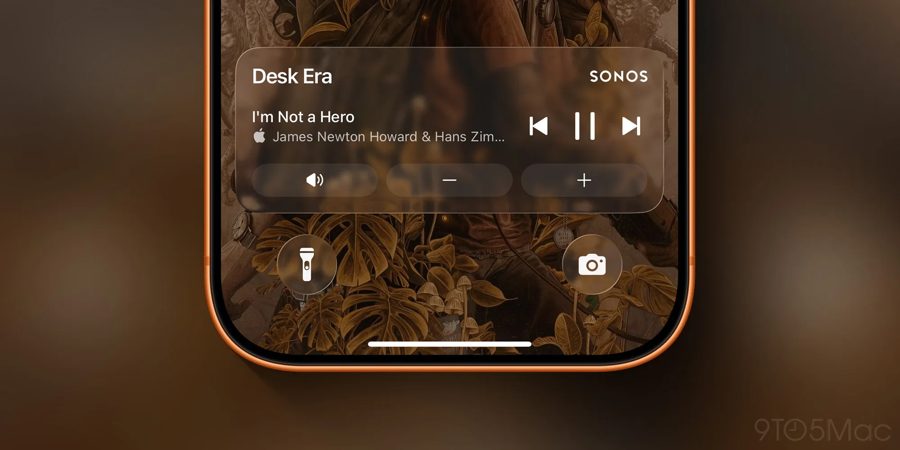
Sonos has officially launched Live Activities support in its iOS app, giving users a long-awaited way to control playback directly from the iPhone's Lock Screen. The feature, which has been one of the most requested additions since the controversial app redesign, is now available in the latest update.
According to a post on Reddit by Sonos, the Live Activity will appear after a user starts playing music and then closes the app. It will display the current room or group from which audio was last played. When playback stops, the Live Activity disappears after 15 minutes. To make changes to playback, users must first unlock their iPhone using Face ID or a passcode — the controls are not accessible from the Lock Screen without authentication.
The update comes after months of user frustration following a major app overhaul that removed several key features, leading to widespread criticism and eventually the departure of Sonos' CEO. Bloomberg reported in February that Live Activity support was in development, and its arrival now marks a significant step in restoring functionality.
For those who prefer not to use the feature, it can be disabled in the app's settings. Sonos also noted that album art is not currently included in the Live Activity, but the company is "exploring alternative ways to enhance the lock screen experience." Additionally, Live Activities will work with CarPlay and on Apple Watch, though specific details about how they will function on those platforms have not yet been provided.